Set up your email account in Mac Mail
To configure your SiteGround Email account to work on the Mail app on your Mac, follow the instructions that you will find in our detailed tutorial:
Set up your email account in Microsoft Outlook
To set up your email account with Microsoft Outlook, follow the instructions that you will find in our detailed tutorial:
Access your email via Webmail
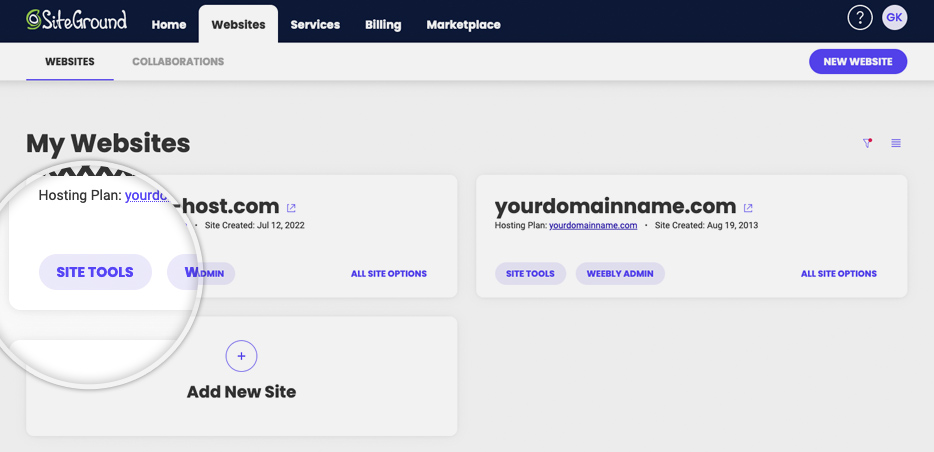
If you prefer to use the webmail interface directly instead of email clients like Microsoft Outlook and Mac Mail, go to your Client Area > Websites > Choose the preferred domain and click on Site Tools.
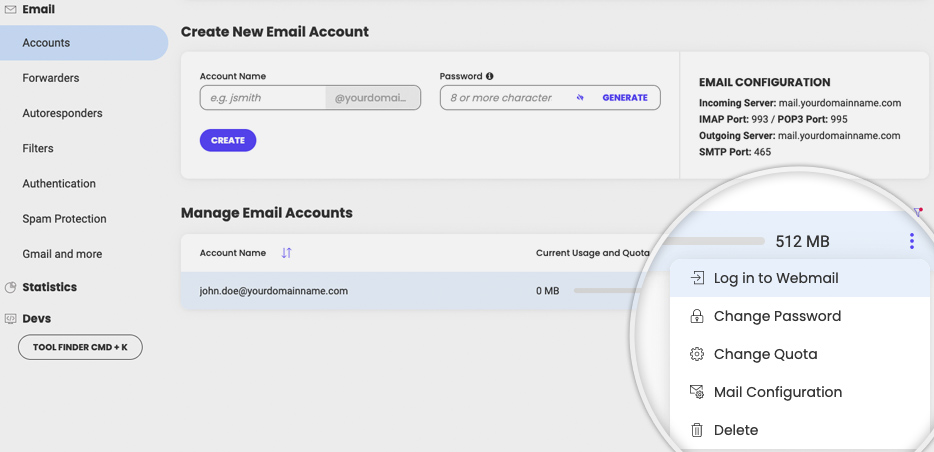
Go to Email > Accounts and under Manage Email Accounts, click on the Actions menu next to the desired email account > Log in to Webmail.
Was this article helpful?
That’s Great!
Thank you for your feedback
Sorry! We couldn't be helpful
Thank you for your feedback
Feedback sent
We appreciate your effort and will try to fix the article